Best GUI Client for Hetzner Object Storage (2026): Mac, iPhone, and Web
Hetzner Object Storage is S3-compatible storage hosted in Germany and Finland. It is one of the lowest-cost ways to keep backups, media, and app files in the EU: a flat base price covers the first terabyte of storage and the first terabyte of egress, and API requests are free.
What it does not ship is a full file manager. The Hetzner Console creates buckets and S3 credentials, and Hetzner points you to S3-compatible tools for everything else. A GUI client fills that gap: browse buckets like folders, drag files in and out, preview objects, and share links.
BucketMate is a local-first S3 GUI for macOS, iOS, and Web, and Hetzner Object Storage has its own option in the provider picker.
Download BucketMate for macOS, get the iOS app on iPhone and iPad, or open the Web app. Start on the free plan and upgrade with a one-time Pro license - see pricing.
What you need before you connect
Every S3 client needs the same three things for Hetzner:
- Endpoint:
https://<location>.your-objectstorage.com - Region: the same location code, such as
fsn1 - Access key and secret: an S3 credential from the Hetzner Console
Hetzner runs Object Storage in three locations:
| Location | Region | Endpoint |
|---|---|---|
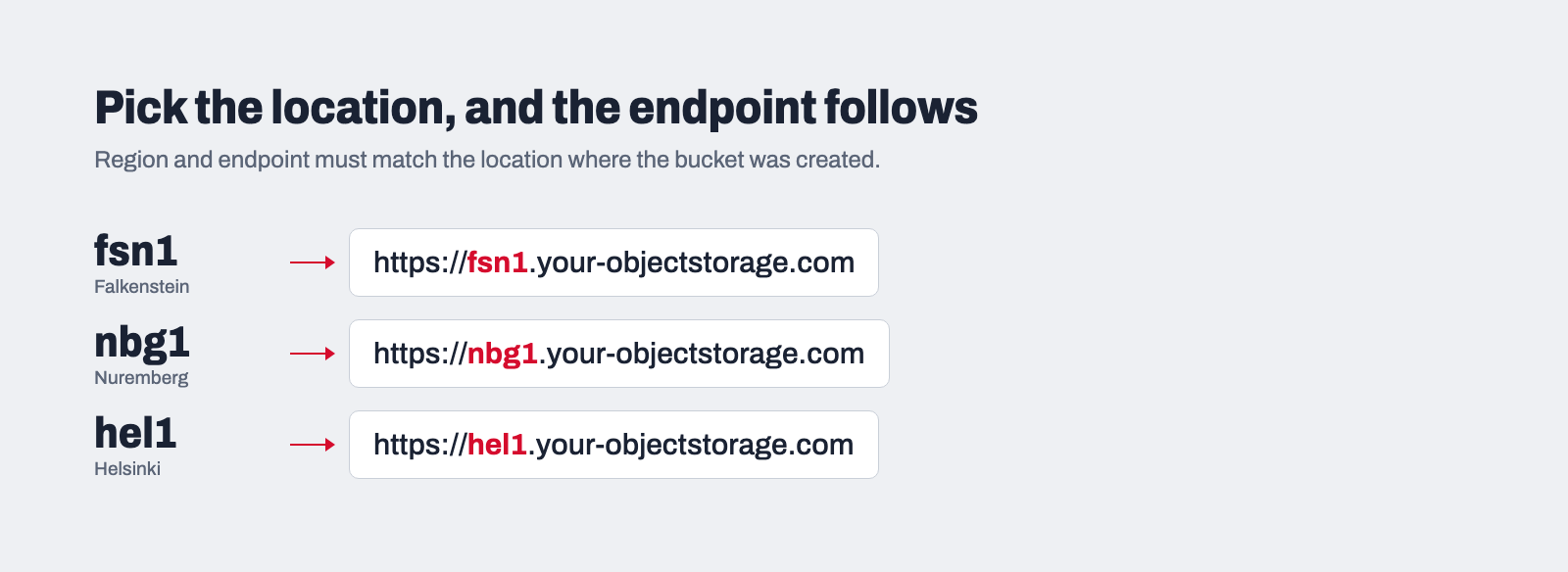
| Falkenstein, Germany | fsn1 | https://fsn1.your-objectstorage.com |
| Nuremberg, Germany | nbg1 | https://nbg1.your-objectstorage.com |
| Helsinki, Finland | hel1 | https://hel1.your-objectstorage.com |
The rule that trips people up: the region must equal the location in the endpoint, and both must match the location where the bucket was created. A bucket made in Helsinki is reached through hel1, not fsn1.
Create S3 credentials in the Hetzner Console
- Sign in to the Hetzner Console and open the project that holds your buckets.
- Go to Security, then the S3 credentials tab.
- Choose Generate credentials and give the key a description you will recognize later.
- Copy the access key and the secret key right away. Hetzner shows the secret only once.
By default a key works for every bucket in the same project. If you want a key limited to one bucket, Hetzner documents how to restrict access with a bucket policy. For a GUI connection you use day to day, a project key with full access is the usual choice.
If you do not have a bucket yet, create one in the Console under Object Storage, pick its location, and note that location. You will need it in the next step.
Connect Hetzner Object Storage in BucketMate
The steps are the same on Mac, iPhone, iPad, and the web.
- Open BucketMate and choose Add connection.
- Select Hetzner Object Storage as the provider.
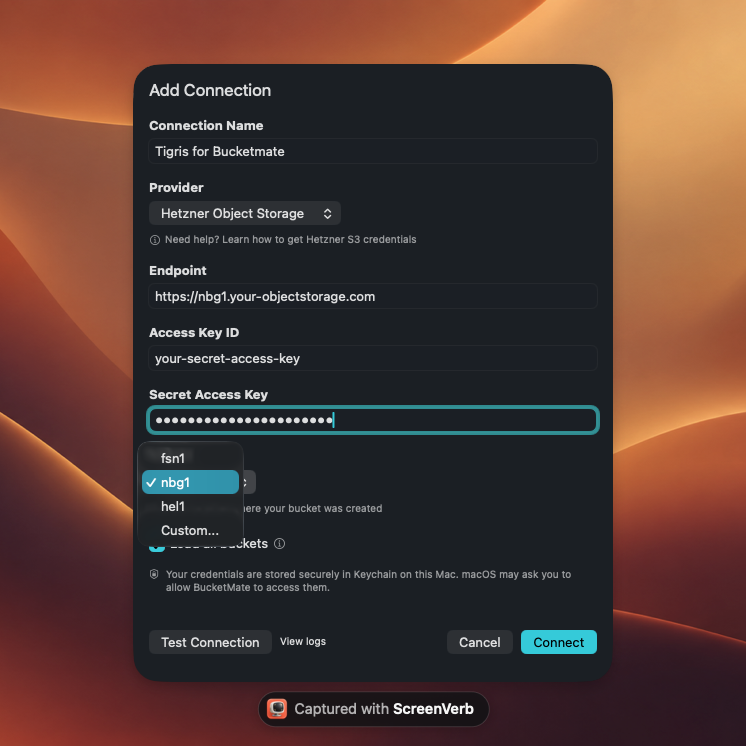
- Pick the region that matches your bucket:
fsn1,nbg1, orhel1. On macOS and iOS the endpoint follows the region you pick. On the web, pastehttps://<location>.your-objectstorage.comwith the same location. - Paste the access key and secret.
Each location has its own endpoint:
On macOS, picking nbg1 fills in the matching endpoint:
- Choose Test connection, then save.
Your buckets now show up like folders. Open one to browse prefixes, drag files from Finder or the Files app, preview images, PDFs, and text, and copy a presigned link when you need to share a private file.
Credentials never leave your device. The Mac and iOS apps store them in Apple Keychain, and the Web app keeps them in your browser profile with optional passkey encryption. Requests go straight from your device to Hetzner.
Buckets in more than one location
Because each endpoint serves one location, plan on one connection per location. If you keep production backups in fsn1 and a replica in hel1, add two connections and put them in the same workspace. You get both locations side by side, and you can drag objects from one to the other.
The same workspace can also hold AWS S3, Cloudflare R2, Backblaze B2, or Tigris. That is handy when you are moving data to Hetzner from another provider and want to check both sides as you go.
Things worth knowing about Hetzner Object Storage
A few Hetzner specifics shape how you use a GUI with it:
- Pricing is per account. The base price is billed hourly for every hour you have at least one bucket, even an empty one. It includes 1 TB of storage and 1 TB of egress per month. Extra storage and egress are billed pay as you go, and ingress and S3 API calls are free.
- Small files cost more than they look. Objects under 64 KB are billed as 64 KB. If you store millions of tiny files, bundle them first.
- Rate limits apply. Hetzner allows up to 750 requests per second per bucket and per source IP. A
503 SlowDownresponse means you hit that ceiling. Retry with fewer parallel transfers. - Bucket limits. You can create up to 100 buckets, each holding up to 100 TB and 50 million objects.
- Versioning and object lock are configured through the S3 API. BucketMate for Mac can turn versioning on for a bucket and lets you browse earlier versions of a file.
Check the current numbers on the Hetzner Object Storage page before you plan a large migration.
Fixing common connection errors
| Error | Likely cause | Fix |
|---|---|---|
SignatureDoesNotMatch | Region and endpoint location differ, or the secret was copied wrong | Use the same location in both, then re-paste the secret |
NoSuchBucket | The bucket lives in another location | Switch the endpoint and region to the bucket's location |
InvalidAccessKeyId | The key belongs to a different project or was deleted | Generate new S3 credentials in the bucket's project |
503 SlowDown | Over 750 requests per second | Wait a moment and lower parallel transfers |
GUI or command line?
Both have a place. A GUI is faster when you want to look around: check what landed in a backup folder, upload a few assets, preview a file, or grab a share link from your phone. The AWS CLI, rclone, and similar tools are the right pick for scheduled backups, CI jobs, and large syncs you want to script and log. Many teams use both against the same Hetzner buckets.
FAQ
Does Hetzner have a desktop app for Object Storage?
No. Hetzner offers the web-based Console for buckets and credentials and recommends S3-compatible tools for file work. BucketMate is a native Mac and iOS app, plus a web app, that works with Hetzner over the S3 API.
Which region do I use for Hetzner Object Storage?
Use the location code of the bucket: fsn1, nbg1, or hel1. The endpoint uses the same code.
Can one connection see buckets in all three locations?
Each connection points at one location's endpoint. Add a connection per location and group them in a workspace.
Is BucketMate free for Hetzner?
The free plan includes one connection, one workspace, and uploads up to 100 MB per file. Pro is a one-time purchase that removes those limits.