Cloudflare R2 GUI for macOS (2026): Browse R2 Buckets Like a File Manager
A Cloudflare R2 GUI is a graphical client that talks to R2 over the S3-compatible API. You list buckets, browse prefixes like folders, drag files up and down, preview objects, and share links - without living in the Cloudflare dashboard or typing aws s3 for every lookup.
BucketMate is a local-first S3 GUI for macOS, iOS, and Web. R2 is a first-class provider: same file-manager layout you would use for AWS S3 or MinIO.
Download BucketMate for macOS, get the iOS app on iPhone and iPad, or open the Web app. Pricing is a free plan plus a one-time Pro license - see pricing.
What an R2 GUI actually is
R2 does not have a proprietary desktop protocol. Clients connect with:
- Endpoint:
https://<account-id>.r2.cloudflarestorage.com - Access Key ID and Secret from an R2 API token
- Region:
auto
Any S3-compatible GUI that supports custom endpoints can be an R2 GUI. The useful distinction is daily UX: dashboard chrome vs a file manager vs a terminal.
Copy-paste endpoint examples for CLI and SDKs live in the Cloudflare R2 S3 endpoint setup guide.
Why not only the Cloudflare dashboard
The dashboard is the right place to create buckets, mint API tokens, attach custom domains, and check billing. It is a weak daily file manager.
| Job | Cloudflare dashboard | R2 GUI (BucketMate) | CLI / rclone / s5cmd |
|---|---|---|---|
| Create bucket, tokens, public domain | Best | No | No |
| Browse prefixes, rename, preview | Slow / admin UI | File-manager layout | Poor discovery |
| Drag-and-drop uploads | Awkward | Yes | Scripts |
| Same window as S3 / MinIO | One vendor | Multi-provider hub | Config files |
| Bulk sync / CI | No | Ad-hoc batches | Best |
Use the dashboard for account setup. Use a GUI for objects. Use the CLI when a script should own the transfer.
Zero-egress vs S3 pricing is a separate decision: Cloudflare R2 vs AWS S3.
Connect R2 in BucketMate
- In the Cloudflare dashboard, open R2 and copy your Account ID. Endpoint is
https://<account-id>.r2.cloudflarestorage.com. - Create an R2 API token with Object Read & Write (or tighter scopes). Copy the Access Key ID and Secret - the secret is shown once.
- Download BucketMate (macOS 13+), install the iOS app on iPhone or iPad, or open web.bucketmate.app.
- Add connection → Cloudflare R2.
- Paste the endpoint, access key, and secret. Set region to
auto. The same R2 connection works on Mac, iOS, and Web.
Fill the Add Connection dialog:
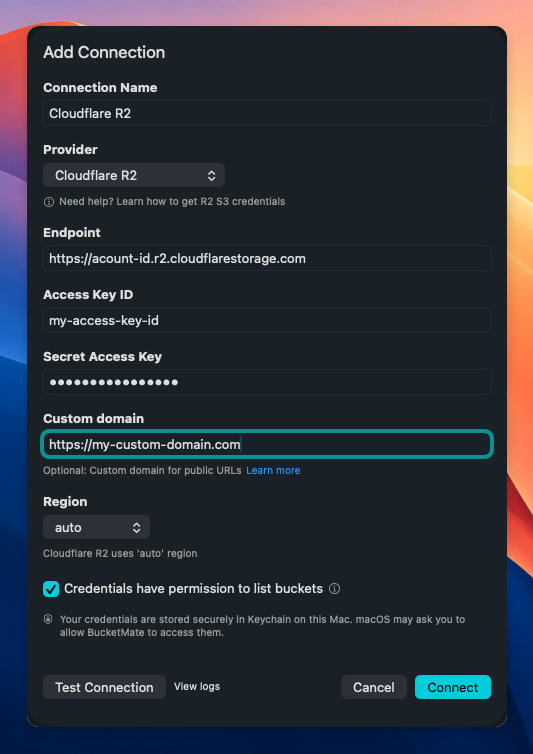
- Test connection, then save. Buckets appear like folders.
If the token cannot list every bucket, turn off “Credentials have permission to list buckets” and enter bucket names manually. Full key and CLI examples: R2 S3 endpoint setup.
Credentials stay on the device (Keychain on Mac and iOS, browser profile on Web). BucketMate talks to R2 directly - no proxy of your objects through BucketMate servers.
When to use a GUI vs the CLI
Stay in the GUI when you are:
- Checking what is in a prefix
- Uploading a handful of assets
- Previewing an image, PDF, or JSON file
- Minting a presigned share link
- Jumping between R2 and S3 in one window
- Checking a bucket from iPhone or iPad
Stay in the CLI (or rclone / s5cmd) when you are:
- Running CI or a deploy script
- Syncing large trees on a schedule
- Doing a one-shot multi-gigabyte copy you want to log and retry
A practical split: GUI for interactive work, CLI for automation. Compare other Mac clients (Cyberduck, Transmit, console) in best S3 GUI for macOS.
FAQ
Is there an official Cloudflare R2 desktop app for Mac?
No. Cloudflare’s UI is the web dashboard. Desktop access is S3-compatible clients: BucketMate, Cyberduck, Transmit, rclone, AWS CLI, and similar.
Can I use the same GUI for R2 and AWS S3?
Yes, if the client supports custom endpoints and multiple connections. BucketMate treats R2 as a provider next to S3 and MinIO. Hybrid cost notes: R2 vs AWS S3.
Does BucketMate work with R2 on iOS and the web, not only Mac?
Do I still need AWS CLI after installing a GUI?
Keep it for scripts. A GUI does not replace aws s3 sync in CI. It replaces clicking through the dashboard to find one object.
Related resources
- Cloudflare R2 S3 endpoint setup - keys,
region=auto, CLI and SDK - Cloudflare R2 vs AWS S3 - storage, egress, and when to run both
- Best S3 GUI for macOS - Cyberduck, Transmit, console, CLI, BucketMate
- Cloudflare R2 pricing 2026
- BucketMate pricing
- BucketMate for iOS
- Download BucketMate